
If you’re aiming for seamless multitasking, an ultrawide monitor offers a continuous, immersive display that reduces distractions and minimizes bezels. Dual monitors give you flexibility by allowing different applications on separate screens but may take up more space and cost more over time. Your choice depends on your workspace, budget, and work style. To find the best setup for your needs and discover tips, keep exploring the details behind each option.

Get your next haul delivered free — and shop member deals
- Fast, free delivery on millions of items
- Access to Prime Big Deal Days deals on October 6–7
- Prime Video, Amazon Music and more included
Key Takeaways
- Ultrawide monitors provide a seamless, continuous display ideal for multitasking and reducing visual disruptions.
- Dual monitors offer flexibility with independent adjustments and dedicated screens for specific tasks.
- Ultrawide setups typically cost more but save space and reduce clutter compared to dual monitor arrangements.
- Dual monitors allow easier window management and task separation, enhancing multitasking efficiency.
- Both configurations support high-resolution displays, but choice depends on workspace, budget, and ergonomic preferences.
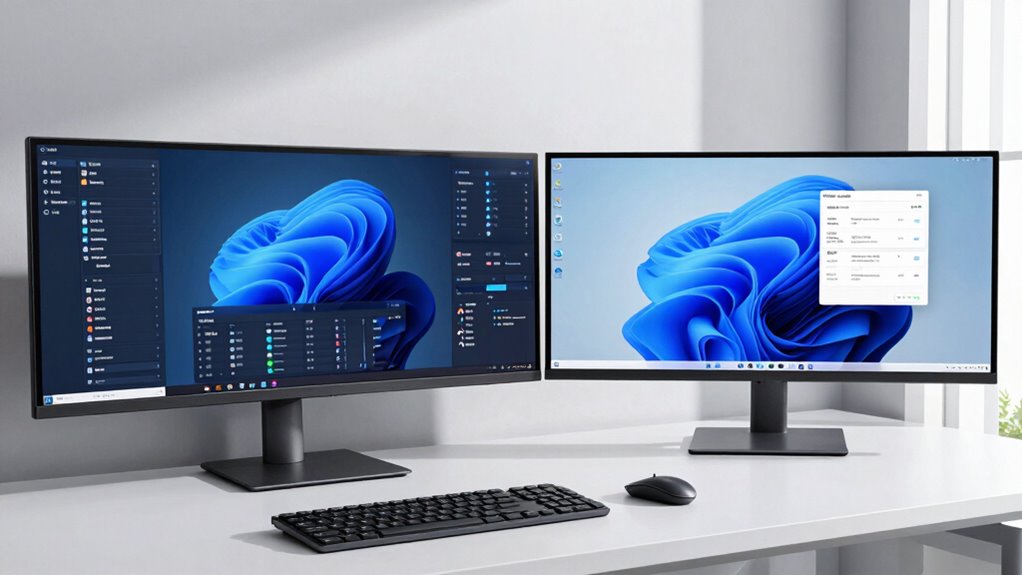
When it comes to boosting productivity, choosing the right monitor setup can make a significant difference. If you’re trying to decide between an ultrawide monitor and dual monitors, understanding how each impacts your workflow is essential. One key factor to consider is screen resolution. Ultrawide monitors typically offer a wide, seamless display with high resolutions like 3440×1440 or even 5120×1440, giving you a broad workspace without bezels interrupting your view. This can be ideal for tasks that benefit from a continuous display, such as video editing, multitasking, or detailed design work. On the other hand, dual monitors usually have standard resolutions—commonly 1920×1080 or 2560×1440 for each screen—allowing you to spread out your applications across two screens. While this setup may involve slightly less total screen real estate, it offers flexibility, as you can choose monitors with different resolutions based on your specific needs.
Ultrawide monitors offer seamless, high-resolution displays ideal for continuous workflows and detailed tasks.
Cost comparison is another crucial element in your decision. Generally, ultrawide monitors tend to be more expensive than a single standard monitor, but when you compare an ultrawide to two separate monitors with similar resolution, the costs can be comparable or even favor dual setups. If you plan to buy two mid-range monitors, you might find that dual monitor setups are more budget-friendly. However, keep in mind that adding a second monitor might also mean investing in a more powerful graphics card to support multiple displays, which can add to the overall cost. Ultrawide monitors come with the benefit of a sleek, unified design, reducing the clutter of multiple cables and stands, which might save you some money and space in the long run. Additionally, monitor resolution plays a significant role in how effectively you can multitask and work across multiple applications. Moreover, the ergonomics of each setup can influence your comfort during long work sessions. Considering the visual experience provided by each configuration can help you decide which setup minimizes eye strain and fatigue over extended periods.
Performance-wise, ultrawide monitors excel in providing a seamless workspace, reducing the distraction of bezels, and offering an immersive experience. Dual monitors, however, grant you more flexibility—you can position them at different angles, adjust their height independently, or replace one if needed, without affecting the other. For multitasking, dual displays might feel more natural because you can dedicate specific screens to specific tasks, reducing the need to switch between windows. Additionally, advancements in display technology have improved the clarity and color accuracy of both setups, further influencing productivity and visual comfort.
Ultimately, your choice depends on your work style, space, and budget. If you prefer a clean, unified workspace that minimizes visual breaks, an ultrawide monitor could be the best fit. But if you value flexibility and potentially lower costs, dual monitors might serve you better. Both setups can significantly enhance productivity, so consider your specific tasks and preferences before making a decision.
ultrawide monitor 34 inch 3440×1440
As an affiliate, we earn on qualifying purchases.
As an affiliate, we earn on qualifying purchases.
Frequently Asked Questions
Which Monitor Setup Is More Cost-Effective Long-Term?
A dual monitor setup is generally more cost-effective long-term because it offers flexibility and easier upgrades within your budget considerations. Ultrawides tend to be pricier upfront, and durability concerns might lead to additional costs if the screen gets damaged. With dual monitors, you can replace or upgrade one screen at a time, making it a more adaptable and budget-friendly option over time.
How Do Ultrawide Monitors Impact Gaming Performance?
Ultrawide monitors can impact your gaming performance by potentially reducing frame rates due to their higher resolution and larger display area, which demands more from your GPU. However, they offer better resolution compatibility, providing an immersive experience without the gaps between screens. If your hardware handles the increased load well, you’ll enjoy smoother gameplay. Otherwise, you might need to lower settings to maintain a steady frame rate.
Are Dual Monitors Easier to Set up Than Ultrawides?
Dual monitors are generally easier to set up than ultrawides, especially when considering ergonomics considerations and cable management. You can position each screen independently, making adjustments simpler. Ultrawides require aligning a single large display, which can be trickier and may involve more complex cable management. While dual setups offer flexibility, ultrawides often demand more precise placement, highlighting how simplicity can sometimes come with limitations.
Can Ultrawide Monitors Be Easily Replaced With Multiple Displays?
Yes, you can replace an ultrawide monitor with multiple displays, but you’ll need to take into account multi monitor calibration to ensure seamless visuals. Bezel distraction might become an issue, as the gaps between screens can interrupt your workflow. Setting up multiple displays takes more effort, but offers flexibility. Keep in mind, adjusting settings and calibration is essential for a smooth, cohesive experience, making it a worthwhile trade-off.
Do Ultrawide Monitors Cause More Eye Strain Than Dual Monitors?
Ultrawide monitors can cause more eye strain and visual fatigue compared to dual monitors, especially if you sit too close or the screen is too bright. The continuous, wide display can make focusing harder, leading to discomfort over time. Dual monitors, with separate screens, allow better adjustment and less eye strain. To minimize issues, guarantee proper distance, lighting, and regular breaks regardless of your setup choice.
dual monitor setup 24 inch 1080p
As an affiliate, we earn on qualifying purchases.
As an affiliate, we earn on qualifying purchases.
Conclusion
Choosing between ultrawide and dual monitors is like selecting the perfect set of wings for your flight. Ultrawides offer a seamless, expansive sky, ideal for immersive tasks, while dual monitors give you the flexibility of a layered, dynamic cockpit. Consider your work style and space to find your ideal wingspan. Whichever you choose, remember, the right setup will elevate your productivity and help you soar through your tasks with clarity and ease.
ergonomic monitor stand for dual monitors
As an affiliate, we earn on qualifying purchases.
As an affiliate, we earn on qualifying purchases.
curved ultrawide monitor for multitasking
As an affiliate, we earn on qualifying purchases.
As an affiliate, we earn on qualifying purchases.
Fall Picks
fall essentials
As an affiliate, we earn on qualifying purchases.