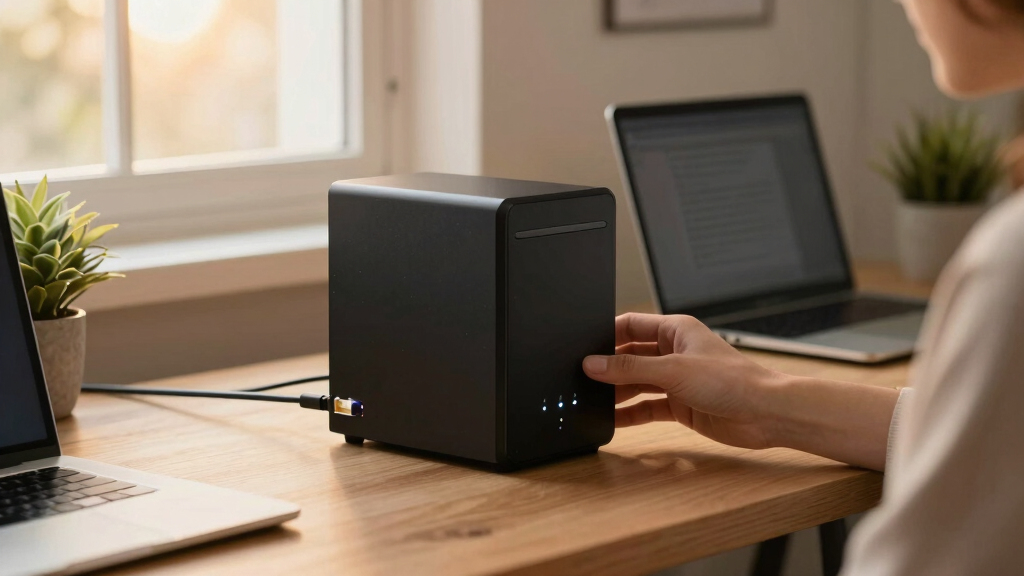

When choosing the best home network storage systems, the key considerations include capacity, speed, ease of setup, and expandability. The UGREEN NAS DXP4800 Plus stands out as the overall top pick for its robust performance and versatile features. For those on a budget, the BUFFALO LinkStation 210 offers reliable storage with simple network access, while content creators might prefer the UGREEN NAS DXP2800 for its multimedia capabilities. Each option balances different priorities, making the decision more about your specific needs than a one-size-fits-all solution. Continue reading for a detailed breakdown of each system’s strengths and tradeoffs.

Get your next haul delivered free with Prime
- Fast, free delivery on millions of items
- Prime Video, Amazon Music and more included
- Member-only deals all year
Key Takeaways
- Top-tier performance and expandability favor models like UGREEN NAS DXP4800 Plus for demanding users.
- Ease of use and affordability make BUFFALO LinkStation 210 a strong choice for beginners and casual home users.
- Professional content creators benefit from features like HDMI output and high-speed networking, as seen in select UGREEN and Synology models.
- Capacity options vary widely; consider future storage needs when choosing between 2-bay and 4-bay systems.
- Price often correlates with features—more expensive units generally offer better speed, expandability, and management tools.




More Details on Our Top Picks
UGREEN NAS DXP4800 Plus 4-Bay Desktop NAS, Intel Pentium Gold 8505 5-Core CPU, 8GB DDR5 RAM, Built-in 128G SSD, 1 * 10GbE, 1 * 2.5GbE, 2 * M.2 NVMe Slots, 4K HDMI, Network Attached Storage (Diskless)
This UGREEN model stands out for its high-performance hardware and advanced features like Docker and virtual machines, making it ideal for small offices or power users. Compared to the Synology DS223j, it offers faster processing and more flexibility with drive and network options, though it involves a steeper learning curve and higher cost. The inclusion of 10GbE and 2.5GbE ports means blazing transfer speeds, perfect for large multimedia or backup tasks. Its AI-powered photo organization is a bonus for users with extensive photo libraries, and the wide compatibility across devices simplifies remote access. However, the diskless design means additional hard drives are necessary, and setup can be complex for beginners. This pick makes the most sense for tech-savvy users needing raw power and expandability, willing to handle some configuration.
Pros:- Powerful Intel Pentium Gold 8505 CPU with 5 cores for demanding tasks
- Supports Docker and virtual machines for versatile use cases
- Blazing transfer speeds with 10GbE and 2.5GbE ports
Cons:- Requires purchasing and installing hard drives separately
- Complex setup process that might intimidate beginners
- Higher price point compared to simpler NAS models
Best for: Small office or advanced home users who want high speed, virtualization, and flexible storage options.
Not ideal for: Beginners or those seeking a simple, plug-and-play NAS solution without extensive setup.
- Digital Storage Capacity:144 TB
- Hard Disk Interface:Serial ATA
- Connectivity Technology:Ethernet, HDMI, SATA, USB
- Additional Features:Intel 5-Core CPU, 8GB DDR5 RAM, 1x 10GbE, 1x 2.5GbE, M.2 NVMe slots, 4K HDMI
- Hard Disk Form Factor:3.5 Inches
- Form Factor:Desktop
- Item Weight:3.79 Kilograms
Bottom line: This system is best for experienced users who need performance, expandability, and advanced networking features.
BUFFALO LinkStation 210 4TB 1-Bay NAS Network Attached Storage with HDD Hard Drives Included
Compared with the Synology DS223j, the BUFFALO LinkStation 210 offers a straightforward, budget-friendly solution with included drives, making it especially appealing for users who prioritize ease of setup and affordability. It supports RAID for data security and functions well as a simple personal cloud, although it lacks the advanced features or speed of higher-end models like the UGREEN DXP4800 Plus. The 4TB capacity and included drives mean you can start using it immediately, with US-based support and a two-year warranty providing peace of mind. However, it offers slower transfer speeds and limited expandability, making it less suitable for power users or those with large multimedia libraries. This model makes sense for users seeking reliable, easy-to-use storage without a hefty price tag.
Pros:- Includes pre-installed 4TB hard drive for immediate use
- Supports RAID for data protection
- Simple setup with Buffalo’s US-based support
Cons:- Limited to 4TB storage capacity
- Slower transfer speeds compared to higher-end models
- Basic feature set without advanced multimedia or virtualization support
Best for: Home users or small families wanting a reliable, plug-and-play NAS with included drives for basic backup and file sharing.
Not ideal for: Power users needing high-speed transfers, virtualization, or extensive customization options.
- Digital Storage Capacity:4TB
- Hard Disk Interface:HDD (Included)
- Connectivity Technology:Ethernet
- Additional Features:RAID support, Plug-and-play, US-based support
- Hard Disk Form Factor:3.5 Inches
- Item Weight:2.43 Pounds
Bottom line: Ideal for budget-conscious users seeking a straightforward, ready-to-use NAS for everyday file sharing and backup.
BUFFALO LinkStation 710 4TB 1-Bay NAS Network Attached Storage with HDD Hard Drives Included
Compared with the DS223j, the BUFFALO LinkStation 710 offers a more compact design with included drives, suitable for users who want a reliable, easy-to-set-up home cloud and backup device. Its 4TB capacity and simple interface make it accessible for non-technical users, and support for macOS 26 and Windows enhances versatility. While it doesn’t match the performance or advanced features of the UGREEN DXP4800 Plus, it provides solid security with SSL encryption and a closed system, reducing vulnerabilities. The main tradeoff is slower speeds and limited customization. This pick makes the most sense for families or individuals who need a straightforward, secure storage solution without the complexity or cost of high-end options.
Pros:- Includes 4TB hard drive for immediate use
- Supports SSL encryption for secure file transfers
- Simple setup designed for non-technical users
Cons:- Limited to 4TB capacity
- Slower data transfer speeds compared to high-end models
- Lacks advanced multimedia or virtualization features
Best for: Home users seeking a simple, secure, and reliable network storage device with included drives for basic backup and sharing.
Not ideal for: Power users or content creators needing fast transfers, extensive multimedia features, or virtualization.
- Digital Storage Capacity:4TB
- Hard Disk Interface:HDD (Included)
- Connectivity Technology:Ethernet
- Additional Features:SSL encryption, Easy setup, Compact design
- Hard Disk Form Factor:3.5 Inches
- Item Weight:3 Pounds
Bottom line: A solid choice for families or casual users who want reliable storage with minimal fuss and included drives.
Synology 2-Bay DiskStation DS223j (Diskless)
Compared to the BUFFALO models, the Synology DS223j excels in privacy and multimedia management, offering a flexible platform with DSM OS, making it ideal for users who value data ownership and extensive app support. Its two-bay design allows for scalable storage, though it requires separate drives to be purchased. The setup process is streamlined thanks to Synology’s well-documented guides and community support, making it a favorite for tech-savvy home users. Speed-wise, it won’t match the UGREEN DXP4800 but it provides a more refined user experience and robust data protection. The main limitation is its reliance on user-installed drives, which can be an added step for beginners. This makes sense for users prioritizing privacy, multimedia, and future expandability.
Pros:- Supports creating a private cloud for full data ownership
- Excellent multimedia and file sharing support via DSM
- Flexible two-bay design for future storage expansion
Cons:- Requires separate drives to operate
- Setup may be more involved for beginners
- Less suitable for high-speed transfer needs without SSDs
Best for: Privacy-conscious users or multimedia enthusiasts who want a reliable, customizable NAS with excellent software support.
Not ideal for: Users seeking a turnkey, all-in-one solution with included drives and plug-and-play simplicity.
- Unit Count:1.0
- Built-In Media:Synology DiskStation DSM
- Warranty:2 years
- Compatible Devices:Android, Desktop, Laptop, iPhone
- Mounting Type:Tabletop
- Item Weight:0.87 Kilograms
Bottom line: This NAS is best for privacy-focused users or multimedia lovers comfortable with DIY drive installation.
UGREEN NAS DXP2800 2-Bay Desktop All-Round Ideal for Content Creators and Enthusiasts, Intel N100 Quad-core CPU, 8GB DDR5 RAM, 2.5GbE, 2X M.2 NVMe Slots, 4K HDMI, Network Attached Storage (Diskless)
This UGREEN NAS DXP2800 shines for content creators and tech-savvy users looking for a powerful, versatile storage hub. Its Intel N100 quad-core processor and 8GB DDR5 RAM enable smooth multitasking, outperforming basic models like the Synology DS223, which is better suited for simpler backup needs. The inclusion of dual M.2 NVMe slots for cache acceleration and 4K HDMI output makes it ideal for multimedia-heavy workflows. However, this power comes with a tradeoff: setup and management are more complex than plug-and-play options, and the device’s size and noise level might be less suitable for small or quiet spaces. It supports up to 80TB storage, with 2.5GbE network for fast transfers, and is compatible with third-party drives, giving flexibility for upgrades. It’s best for advanced users who want a high-performance, expandable NAS with media capabilities.
Pros:- Powerful Intel N100 quad-core CPU supports multitasking
- 8GB DDR5 RAM ensures smooth operation with multiple apps
- Supports 80TB capacity and 2.5GbE for fast data transfer
- Includes dual M.2 NVMe slots for cache acceleration
Cons:- Setup and configuration are more complex than plug-and-play models
- Larger size and noise may be unsuitable for quiet or small environments
Best for: Power users, small media teams, or enthusiasts needing high performance and expandability
Not ideal for: Beginners or users seeking simple, silent, or compact storage solutions
- Processor:Intel N100 Quad-core
- RAM:8GB DDR5
- Network:2.5GbE
- Storage Capacity:Up to 80TB
- Drive Bays:2
- Video Output:4K HDMI
Bottom line: This NAS is ideal for tech-savvy users who need a high-performance, multimedia-capable system with expandability.
Asustor Drivestor 2 Gen 2 AS1202T, 2 Bay NAS, Quad-Core 1.7GHz CPU, 2.5GbE Port, 1GB DDR4, 3 USB 3.0, Network Attached Storage for Personal and Home Cloud Backup (Diskless)
Compared with the more powerful UGREEN DXP2800, the Asustor AS1202T offers a simplified, user-friendly experience perfect for newcomers. Its quad-core 1.7GHz CPU and 1GB DDR4 RAM provide reliable performance for everyday tasks like backups, media streaming, and file sharing. The setup is straightforward thanks to its tool-free drive installation and intuitive App Central, making it suitable for users unfamiliar with complex configurations. It supports up to 32TB with RAID, and the 2.5GbE port allows faster transfers than traditional Gigabit networks. However, its limited RAM and absence of multimedia outputs restrict its capability for intensive multimedia editing or streaming. It’s best for home users who want a reliable, no-fuss private cloud for basic storage and backup needs without steep learning curves.
Pros:- Easy, tool-free drive installation with clear setup instructions
- User-friendly App Central for managing media and backups
- Supports up to 32TB storage with RAID
- Faster 2.5GbE networking for quicker file transfers
Cons:- Limited RAM may impact performance with multiple users
- No multimedia output or transcoding capabilities
- Lacks advanced features like HDMI or virtualization support
Best for: Home users or beginners seeking simple, reliable private cloud storage
Not ideal for: Power users or multimedia professionals needing high throughput or advanced features
- Processor:Quad-Core 1.7GHz
- RAM:1GB DDR4
- Network:2.5GbE
- Drive Bays:2
- Max Capacity:32TB
- USB Ports:3
Bottom line: This NAS suits home users and beginners who prioritize simplicity, quiet operation, and reliable backups over advanced multimedia features.
Synology 2-Bay NAS DS223 (Diskless)
The Synology DS223 offers a budget-friendly, reliable solution for basic home storage needs. Compared to the UGREEN DXP2800, it provides a simpler, more streamlined setup tailored for users who want a private cloud without the complexity of advanced hardware. Its Synology DiskStation Manager interface makes file sharing, backups, and multimedia streaming straightforward, even for novices. The 2-core processor and 2.5GbE port enable decent performance, though it’s less suited for intensive multimedia tasks or heavy multitasking. Its main drawback is limited expandability and lack of hardware transcoding, which might matter for users intending to stream multiple 4K videos or run complex applications. Still, for straightforward data management and small-scale media serving, it’s a smart, cost-effective choice.
Pros:- Easy setup with Synology DSM interface
- Reliable performance for backups and media sharing
- Supports up to 40TB of storage
- 3-year warranty offers peace of mind
Cons:- Limited hardware transcoding for 4K media
- Basic CPU limits multitasking capabilities
- No HDMI or virtualization support
Best for: Home users seeking a simple, reliable, and affordable NAS for backups and media sharing
Not ideal for: Enthusiasts or power users needing high-performance media transcoding or virtualization
- Processor:Dual-core 2.0GHz
- RAM:2GB
- Network:2.5GbE
- Drive Bays:2
- Max Capacity:40TB
- Supported Apps:File sharing, backups, media streaming
Bottom line: This NAS is perfect for cost-conscious home users who want a straightforward, dependable device for backups and media access.
Synology 2-Bay DiskStation DS225+ (Diskless)
The Synology DS225+ offers a balanced mix of performance and user-friendliness, making it suitable for small households or small offices. Its 3-core processor and 2GB RAM support smooth file sharing, backups, and light surveillance system integration, outperforming basic models like the DS223 with a more robust CPU. Its DSM interface is highly intuitive, ideal for users who prefer a GUI over command-line setups. While it supports up to 40TB of storage, its hardware transcode capabilities are limited, which may restrict multimedia streaming quality for multiple remote users. The main advantage is its reliability and comprehensive app ecosystem, though it’s less suitable for intensive multimedia workloads or virtualization. It’s a smart choice for those prioritizing ease of use and multi-platform compatibility.
Pros:- Easy to set up with Synology DSM interface
- Supports up to 40TB of storage
- Reliable hardware for backups and light surveillance
- Three-year warranty provides security
Cons:- Limited hardware transcode for 4K streaming
- Moderate CPU limits extensive multitasking
- No HDMI support
Best for: Small households or offices needing reliable backups and light surveillance integration
Not ideal for: Power users requiring heavy multimedia transcoding or virtualization capabilities
- Processor:Quad-core 2.0GHz
- RAM:2GB
- Network:2.5GbE
- Drive Bays:2
- Max Capacity:40TB
- Supported Apps:File sharing, backups, surveillance
Bottom line: Ideal for small-scale backup, file sharing, and light surveillance needs, especially for users valuing simplicity and reliability.
How We Picked
Our evaluation focused on performance, build quality, ease of setup, expandability, and value. We considered products with different capacity and feature sets to match various user needs. Devices were ranked based on real-world usability, software robustness, and future-proofing—such as upgrade options and network speeds. We also balanced price points to identify options that deliver the best bang for the buck without sacrificing essential features. This approach ensures that whether you prioritize budget, performance, or simplicity, you’ll find a suitable choice in this lineup.Factors to Consider When Choosing Best Home Network Storage Systems
Choosing the best home network storage system involves balancing several factors beyond just capacity. Understanding your specific storage needs, network environment, and technical comfort level will help narrow your options. The following factors will guide you through the critical considerations to make an informed decision and avoid common pitfalls.Capacity and Scalability
Start by estimating your current storage needs and future growth. Systems with 2-bay enclosures are suitable for light use or small households, but if you anticipate needing more space later, a 4-bay model offers easier scalability. Keep in mind that some NAS devices support expanding storage via external drives or adding more bays, which can extend their lifespan and usefulness. Choosing a system with flexible expansion options can save money and effort down the line.
Performance and Network Speed
Performance hinges on processor speed, RAM, and network interface options. For smooth media streaming or large backups, look for units with multi-core processors, ample RAM, and at least Gigabit Ethernet, with some models offering 2.5GbE or 10GbE for faster data transfer. Cheaper or older models might bottleneck your network, especially with multiple simultaneous users. Prioritize devices with the latest connectivity standards if high-speed access is a priority.
Ease of Use and Management
Intuitive setup processes and straightforward management software make a significant difference, especially for beginners. Some NAS systems come with mobile apps and cloud integration that simplify remote access and backups. Avoid overly complex interfaces if you’re not tech-savvy, but also check for features like automatic backups, user management, and security settings. A user-friendly experience helps prevent frustration and reduces the risk of configuration errors.
Build Quality and Reliability
A well-built NAS should have durable hardware and good ventilation to prevent overheating. Look for products from reputable brands with solid warranties and good customer support. Reliability is critical because data loss or hardware failure can be costly. Systems with active monitoring features and redundant power supplies are preferable for those storing important or large volumes of data.
Price and Value
Balance your budget against the features you need. Cheaper models might lack expandability or fast networking, but they can be perfect for basic storage. Higher-end units often include advanced features like multimedia streaming, AI photo management, or multiple drive bays, which justify their higher prices if those features are relevant to you. Consider long-term value—sometimes investing a bit more upfront saves money and hassle later.
Frequently Asked Questions
Can I expand storage on a 2-bay NAS later?
Many 2-bay NAS systems support external drives via USB or eSATA ports, allowing you to increase storage capacity without replacing the device. Some models also support adding more drives if they are part of a larger ecosystem or if you upgrade to a multi-bay enclosure. However, true internal expansion often requires moving to a larger system, so consider your future needs when choosing a model. Planning ahead can prevent the need for costly upgrades later.
Is a diskless NAS better than one with drives included?
Choosing a diskless NAS offers flexibility to select drives that match your performance and capacity needs, often at a lower initial cost. It also allows you to upgrade drives independently as your storage needs grow. However, it requires additional effort to purchase, install, and configure drives, which might be intimidating for beginners. Pre-installed drives are more convenient but typically cost more upfront and limit customization options.
What network speed should I look for in a home NAS?
For most home users, Gigabit Ethernet (1GbE) is sufficient for everyday tasks like backups, media streaming, and file sharing. If you handle large media files or multiple users simultaneously, a 2.5GbE or 10GbE connection can significantly reduce transfer times. Keep in mind that your home network infrastructure, including switches and routers, must support these speeds to realize their benefits. Investing in higher-speed networking hardware makes sense if performance is a top priority.
Are these NAS systems suitable for media streaming?
Yes, many of the highlighted models support media streaming, especially those with HDMI outputs or integrated media servers. Devices like the UGREEN NAS DXP4800 Plus and UGREEN NAS DXP2800 are designed with multimedia in mind, offering 4K HDMI and fast network options. However, streaming performance also depends on your network bandwidth and the device used for playback. For high-quality, multi-room streaming, choose a NAS with strong hardware specs and ensure your network can handle the data flow.
How often should I replace or upgrade my NAS?
Most users find their NAS systems remain effective for 3 to 5 years, depending on their evolving storage needs and technological advances. Upgrades might include replacing drives with larger capacity ones or adding RAM for better performance. If your hardware starts showing signs of failure, or if new features like faster network interfaces or enhanced security become available, consider an upgrade. Regular backups and monitoring can help determine when it’s time to replace or expand your system.
Conclusion
For users seeking the best overall performance and future-proofing, the UGREEN NAS DXP4800 Plus makes an excellent choice. Budget-conscious households or beginners will appreciate the simplicity and affordability of the BUFFALO LinkStation 210. Content creators or media enthusiasts should consider models like the UGREEN NAS DXP2800 or Synology options for their multimedia features. Those needing premium expandability and advanced management might lean toward higher-end Synology models. Ultimately, your ideal system depends on your storage needs, technical comfort, and budget.
Columbus Day / Indigenous Peoples' Day Picks
long weekend sales
As an affiliate, we earn on qualifying purchases.