Choosing the right NAS storage for a home office involves balancing performance, ease of use, and budget. The Synology DS223 stands out as the best overall for its reliable features and user-friendly interface, ideal for most users. For those needing higher capacity and more robust hardware, the Synology DS1525+ offers impressive scalability, while the UGREEN DXP4800 Plus caters to families and small teams with versatile features. The main tradeoffs often revolve around capacity versus complexity and upfront cost versus long-term value. Keep reading to see how these options compare and find the best fit for your needs.

Get your next haul delivered free with Prime
- Fast, free delivery on millions of items
- Prime Video, Amazon Music and more included
- Member-only deals all year
Key Takeaways
- The top-ranked NAS devices balance ease of setup with reliable performance for home office workflows.
- Capacity and scalability are key considerations, especially for users planning to store large media files or backups long-term.
- Pre-bundled drives can offer convenience but often come with a higher initial cost; diskless models provide flexibility for future upgrades.
- Features like remote access, media streaming, and app integrations differentiate entry-level from premium options.
- Choosing between 2-bay and multi-bay systems depends on current needs versus future growth plans.
| Synology DS223 2-Bay Diskless NAS Home & Office Backup Hub |  | Best Overall for Versatile Home and Small Office Use | Storage Bays: 2-Bay | Diskless: Yes | Warranty: 2 Years | VIEW ON AMAZON | See Our Full Breakdown |
| Synology DS1525+ 5-Bay NAS with 8GB RAM and 40TB Bundle (Includes 5 Seagate Ironwolf 8TB HDDs) |  | Best for Scalability and High Performance | Model: DS1525+ | Number of Bays: 5 | RAM: 8GB | VIEW ON AMAZON | See Our Full Breakdown |
| UGREEN DXP4800 Plus 4-Bay NAS for Families, Creators & Small Teams |  | Best for Large Data Needs and Advanced Features | Storage Capacity: Up to 144TB | Number of Bays: 4 | Network Ports: 10GbE, USB | VIEW ON AMAZON | See Our Full Breakdown |
| QNAP TS-233-US 2-Bay Desktop NAS |  | Best Budget-Friendly Home NAS | Processor: ARM Cortex-A55 quad-core 2.0GHz | RAM: 2 GB DDR4 | Number of Bays: 2 | VIEW ON AMAZON | See Our Full Breakdown |
| TERRAMASTER F2-425 2-Bay NAS Intel x86 Quad-Core CPU 4GB RAM (Diskless) |  | Best for Home Multimedia and Data Backup | Processor: Intel x86 quad-core | RAM: 4GB | Number of Bays: 2 | VIEW ON AMAZON | See Our Full Breakdown |
| Synology DiskStation DS223j (Diskless) 2-Bay NAS |  | Best Overall for Secure Private Cloud and Home Security Integration | Number of Bays: 2 | Diskless: Yes | Warranty: 2 years | VIEW ON AMAZON | See Our Full Breakdown |
| UGREEN NAS DH2300 2-Bay Personal Storage for Beginners & Personal Users |  | Best for Beginners and Personal Data Management | Capacity: Up to 64TB | Number of Bays: 2 | Processor: High-performance processor | VIEW ON AMAZON | See Our Full Breakdown |
| Synology DS223 2-Bay DiskStation NAS with 8TB Bundle | | Best for Basic Home and Small Office Storage with Reliability | Processor: Realtek RTD1619B Quad-Core 1.7 GHz | Memory: 2 GB DDR4 | LAN Port: 1 x RJ-45 1GbE | VIEW ON AMAZON | See Our Full Breakdown |
| Synology DS225+ Private Cloud Media Server – 2-Bay Diskless NAS with Intel CPU | 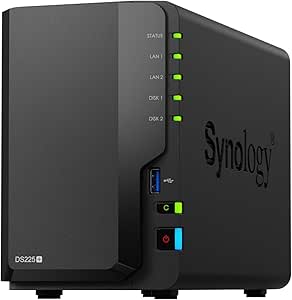 | Best for Media Streaming and Advanced Data Security | Storage Bays: 2 | CPU: Intel | Transfer Speed: 282 MB/s | VIEW ON AMAZON | See Our Full Breakdown |
| Synology DS225+ 2-Bay DiskStation NAS with 8TB Bundle |  | Best for Expandable Performance and Advanced Data Management | Processor: Intel Celeron J4125 | Memory: 2 GB DDR4, expandable to 6 GB | Drive Bays: 2 | VIEW ON AMAZON | See Our Full Breakdown |
| UGREEN NAS DXP2800 2-Bay for Advanced Home Users, Remote Workers & Creators |  | Best Overall for Power Users and Creators | Processor: Intel N100 Quad-Core | RAM: 8GB DDR5 | Network: 2.5GbE | VIEW ON AMAZON | See Our Full Breakdown |
| Asustor Drivestor 2 Gen 2 AS1202T 2-Bay NAS Storage |  | Best Value for Reliable Personal Cloud Storage | Processor: Realtek RTD1619B quad-core 1.7GHz | Network: 2.5GbE Ethernet | Memory: 1GB DDR4 | VIEW ON AMAZON | See Our Full Breakdown |
| Yxk Zero1 2-Bay Desktop NAS with 2.5GbE, Support Docker, 60TB Capacity (Diskless), Remote Access, 4GB RAM, 4K HDMI |  | Best for Beginners and Tech-Savvy Media Users | Capacity: Up to 60TB (diskless) | Number of Bays: 2 | Network Speed: 2.5GbE | VIEW ON AMAZON | See Our Full Breakdown |
| nas storage for home office | Number of Bays | Processor |
|---|---|---|
| Synology DS223 2-Bay Diskless | — | — |
| Synology DS1525+ 5-Bay NAS wit | 5 | — |
| UGREEN DXP4800 Plus 4-Bay NAS | 4 | — |
| QNAP TS-233-US 2-Bay Desktop N | 2 | ARM Cortex-A55 quad-core 2.0GHz |
| TERRAMASTER F2-425 2-Bay NAS I | 2 | Intel x86 quad-core |
| Synology DiskStation DS223j | 2 | — |
| UGREEN NAS DH2300 2-Bay Person | 2 | High-performance processor |
| Synology DS223 2-Bay DiskStati | 2 | Realtek RTD1619B Quad-Core 1.7 GHz |
| Synology DS225+ Private Cloud | — | — |
| Synology DS225+ 2-Bay DiskStat | — | Intel Celeron J4125 |
| UGREEN NAS DXP2800 2-Bay for A | — | Intel N100 Quad-Core |
| Asustor Drivestor 2 Gen 2 AS12 | — | Realtek RTD1619B quad-core 1.7GHz |
| Yxk Zero1 2-Bay Desktop NAS wi | 2 | — |
More Details on Our Top Picks
Synology DS223 2-Bay Diskless NAS Home & Office Backup Hub
The Synology DS223 stands out as the best overall choice for users seeking a balanced combination of ease of use, flexibility, and multimedia integration. Its two-bay design makes it ideal for small-scale backups, file sharing, and basic surveillance, especially when paired with affordable hard drives. Compared with the TERRAMASTER F2-425, the DS223 offers a more user-friendly setup and a broader app ecosystem, though it sacrifices capacity expansion options. This model is perfect for those who want a straightforward, reliable NAS without the complexity of larger systems. The main tradeoff is its limited two-drive capacity, which might restrict future expansion. If you prioritize simple setup, seamless media management, and remote camera monitoring, this pick makes the most sense.
Pros:- Centralizes data from multiple devices for easy access
- Supports collaboration tools and version control
- Automates backups across devices and cloud services
- Transforms IP cameras into a surveillance system
Cons:- Requires purchasing hard drives separately
- Setup may be complex for beginners
- Limited to two drives, restricting maximum storage
Best for: Home users and small business owners needing reliable backups, media streaming, and basic surveillance capabilities
Not ideal for: Power users or teams requiring extensive storage or advanced virtualization features, due to its limited bays and scalability
- Storage Bays:2-Bay
- Diskless:Yes
- Warranty:2 Years
Our verdict“This NAS is best suited for users seeking a reliable, versatile hub for backups, media, and surveillance in a small home or office setting.”
Synology DS1525+ 5-Bay NAS with 8GB RAM and 40TB Bundle (Includes 5 Seagate Ironwolf 8TB HDDs)
The Synology DS1525+ is tailored for those who need substantial storage and high-speed networking. Its five bays and included 40TB of drives make it suitable for media editing, virtualization, and expanding data requirements—outperforming the QNAP TS-233-US in capacity and scalability. While its setup is more complex and the price higher, it offers advanced features like 2.5 GbE ports and optional SSD caching that deliver faster data access and smoother multitasking. This NAS makes sense for tech-savvy users or small teams managing large files or running virtual environments. The main tradeoff is the higher initial investment and additional costs for expansion upgrades, which may be daunting for casual users. If your priority is future-proofing and performance, this pick fits the bill.
Pros:- Scalable storage up to 300 TB with expansion units
- High network performance with 2.5 GbE ports
- Supports virtualization and private surveillance
- Includes robust hardware and warranty
Cons:- Requires separate purchase for expansion hardware and 10 GbE upgrade
- Complex setup may challenge beginners
- Higher price point compared to basic NAS units
Best for: Small businesses, creative professionals, or tech-savvy home users managing large media libraries or virtual environments
Not ideal for: Casual users or those with limited budgets, as its setup and cost are more complex and higher than simpler models
- Model:DS1525+
- Number of Bays:5
- RAM:8GB
- Included Drives:5 x 8TB Seagate Ironwolf HDDs
- Network Ports:2.5 GbE (expandable to 10 GbE)
- Maximum Storage Capacity:up to 300 TB
Our verdict“Ideal for users needing scalable, high-performance storage solutions with advanced networking and virtualization capabilities.”
UGREEN DXP4800 Plus 4-Bay NAS for Families, Creators & Small Teams
The UGREEN DXP4800 Plus is designed for users who require extensive storage and advanced virtual features. With four bays and support for up to 144TB, it caters well to creators, families, and small teams working with large files, multimedia editing, or virtual machines. Its support for Docker, AI photo organization, and remote access places it ahead of simpler models like the QNAP TS-233-US. However, it’s worth noting that hard drives are sold separately, and network performance depends heavily on your setup, since it only supports wired Ethernet. This NAS makes sense for those who want a versatile, private cloud with rich features, but might be overkill for casual or single-user setups. The main tradeoff involves additional drive costs and setup complexity.
Pros:- High storage capacity up to 144TB
- Supports Docker, virtual machines, and AI photo tools
- Secure encryption and permission management
- User-friendly app for remote access and sharing
Cons:- Drives sold separately, increasing initial cost
- Limited to wired Ethernet, no Wi-Fi support
- Network speed depends on hardware setup
Best for: Creative professionals, families with large media libraries, or small teams needing extensive storage and advanced features
Not ideal for: Casual users or those on a tight budget, as it requires separate hard drives and may involve a steeper learning curve
- Storage Capacity:Up to 144TB
- Number of Bays:4
- Network Ports:10GbE, USB
- Compatibility:Windows, macOS, Linux, iOS, Android
- Hard Drives Included:No
- Warranty:2 years
Our verdict“Best suited for power users and creative professionals needing flexible storage and advanced computing features.”
QNAP TS-233-US 2-Bay Desktop NAS
The QNAP TS-233-US offers a budget-conscious option for basic home storage, especially for multimedia and light backups. Its dual-core ARM Cortex-A55 processor and 2GB DDR4 RAM provide enough power for streaming movies, storing photos, and simple file sharing. When compared with the Synology DS223, it lacks some of the advanced surveillance and collaboration features, but it compensates with affordability. However, the limited RAM may hinder multitasking if multiple users access large files simultaneously, and it doesn’t include HDMI or 4K media support, which could be a downside for multimedia enthusiasts. This model is ideal for users who want an entry-level NAS without the need for extensive features or future expansion.
Pros:- Affordable price point
- Supports multimedia streaming and basic file storage
- Includes security features like snapshots
- Easy to set up and manage
Cons:- Limited RAM for multitasking and multiple users
- No HDMI or 4K support for advanced media playback
- Limited expansion options
Best for: Home users looking for an affordable, straightforward NAS for media streaming and basic backups
Not ideal for: Power users or households with high multitasking needs, due to its limited RAM and feature set
- Processor:ARM Cortex-A55 quad-core 2.0GHz
- RAM:2 GB DDR4
- Number of Bays:2
Our verdict“A solid choice for budget-minded individuals needing simple storage and media streaming, but not suited for heavy multitasking.”
TERRAMASTER F2-425 2-Bay NAS Intel x86 Quad-Core CPU 4GB RAM (Diskless)
The TERRAMASTER F2-425 caters to users who need a powerful yet simple NAS for multimedia and backups. Its Intel x86 quad-core processor and 4GB RAM support 4K transcoding and multiple users simultaneously, outperforming the QNAP TS-233-US in processing capability. The hardware-level 4K decoding ensures smooth playback of high-resolution videos, making it ideal for home entertainment setups. However, being diskless, it requires users to purchase drives separately, and its two-bay design limits total storage potential compared to larger models. This NAS makes sense for those prioritizing media performance and reliable backup without extra complexity. The main tradeoff involves the need for additional hard drive investment and a more manual setup process.
Pros:- Powerful quad-core processor for multitasking
- Supports hardware 4K transcoding
- Quiet operation at 19dB(A)
- Easy tool-free HDD installation
Cons:- No included hard drives, increasing initial cost
- Limited to 2 bays, less expandable
- Customer reviews suggest some desire more RAID options
Best for: Home users who want a dedicated media server and reliable data backup with hardware transcoding
Not ideal for: Users needing extensive storage expansion or advanced RAID options, due to its limited bays and diskless configuration
- Processor:Intel x86 quad-core
- RAM:4GB
- Number of Bays:2
- Maximum Storage:60TB
- Network Speed:2.5GbE
- Warranty:2 Years
Our verdict“Best suited for home entertainment enthusiasts seeking a quiet, high-performance media server and backup device.”
Synology DiskStation DS223j (Diskless) 2-Bay NAS
The Synology DiskStation DS223j stands out for its robust private cloud capabilities combined with security features, making it ideal for users prioritizing data privacy and device management. Unlike the DS223, which comes with pre-installed drives, this diskless model offers greater flexibility in choosing storage, but that also means an extra step for setup. Its support for IP camera monitoring makes it a strong choice for home security integration. The 2-year warranty and ongoing software updates bolster its reliability. Tradeoffs include the need to purchase disks separately and its limited expansion options, which could be restrictive for growing data needs.
Pros:- Robust private cloud with multi-platform access
- Supports home security camera monitoring
- Includes 2-year warranty and ongoing updates
- Secure data management across devices
Cons:- Requires purchasing disks separately, adding initial setup effort
- Limited to 2 bays, restricting future expansion
Best for: Home users who want a secure private cloud combined with home security features and flexible storage options
Not ideal for: Users seeking an all-in-one device with built-in drives or larger capacity for expanding storage without additional disks
- Number of Bays:2
- Diskless:Yes
- Warranty:2 years
- Supported Features:Private cloud, file sharing, automated backups, home security monitoring
Our verdict“This NAS is perfect for privacy-conscious home users who want security features integrated with easy remote access.”
UGREEN NAS DH2300 2-Bay Personal Storage for Beginners & Personal Users
The UGREEN NAS DH2300 offers an accessible entry point for newcomers needing reliable personal storage, with support for up to 64TB capacity and AI-powered photo organization. Compared to the Synology DS223, it simplifies setup for those unfamiliar with NAS systems, but it lacks built-in Wi-Fi, necessitating an external adapter, and does not support advanced features like Docker or virtual machines. Its security features, including RAID modes and encrypted transfers, enhance privacy for personal data. However, its focus on basic backup and storage limits its use for more demanding or professional environments, which makes it less suitable for power users or small teams.
Pros:- Very easy to set up and operate
- Supports large storage up to 64TB
- Fast transfer speeds and AI-based photo management
- Strong privacy with layered security
Cons:- Requires external USB Wi-Fi adapter, adding complexity
- Limited to basic backup and storage functions
- No support for advanced applications like Docker
Best for: Beginners or individuals seeking straightforward, large-capacity personal storage with AI organization
Not ideal for: Advanced users or small businesses needing virtual machine support or extensive network features
- Capacity:Up to 64TB
- Number of Bays:2
- Processor:High-performance processor
- Transfer Speed:125MB/s
- Security Features:RAID, two-factor authentication, encrypted transfers
- Wi-Fi Support:Requires external USB adapter
Our verdict“Ideal for personal users wanting simple yet scalable storage with smart organization tools.”
Synology DS223 2-Bay DiskStation NAS with 8TB Bundle
The Synology DS223 with an 8TB bundle offers a straightforward solution for home and small office environments, combining reliable hardware with pre-installed drives. Its quad-core Realtek processor and 2GB RAM handle everyday tasks well, but performance may lag with multiple users or intensive applications, especially compared to the more powerful DS225+. The included Seagate IronWolf drives ensure dependable storage, and the hot-swap bays facilitate easy maintenance. This model is less suited for users who require high scalability or advanced features like virtualization, which makes it a solid, budget-friendly choice for basic data sharing and backups.
Pros:- Easy-to-use interface suitable for beginners
- Pre-installed 8TB storage bundle
- Supports private cloud and remote access
- Reliable Seagate IronWolf drives included
Cons:- Limited RAM may affect multitasking performance
- Basic hardware specs restrict heavy workloads
- No SSD cache for faster data access
Best for: Home and small office users needing a plug-and-play storage solution with reliable drives
Not ideal for: Power users or those needing high performance for multiple concurrent tasks or virtual environments
- Processor:Realtek RTD1619B Quad-Core 1.7 GHz
- Memory:2 GB DDR4
- LAN Port:1 x RJ-45 1GbE
- Included HDDs:2 x 4TB Seagate IronWolf
- Warranty:2 Year
- Number of Bays:2
Our verdict“Best suited for users seeking a simple, reliable storage setup with included drives for everyday use.”
Synology DS225+ Private Cloud Media Server – 2-Bay Diskless NAS with Intel CPU
The Synology DS225+ excels for users who want a versatile media server with advanced data protection, thanks to its Intel CPU and support for 4K streaming. Compared to the DS223, which focuses on basic cloud and security, this model offers better media capabilities and surveillance support, including AI detection for up to 30 cameras. Its 3-year warranty adds confidence, but being diskless means users must buy drives separately, which can increase initial costs and setup complexity. Its advanced features may intimidate beginners, making it better suited for users comfortable with more complex configurations who need a multi-purpose device.
Pros:- Supports 4K media streaming and surveillance cameras
- Multi-layered data protection with RAID and snapshots
- AI detection for security cameras
- Reliable 3-year warranty
Cons:- Requires separate disks, adding to initial setup cost
- Complex setup for users unfamiliar with advanced features
- Higher price point for advanced capabilities
Best for: Home users or small businesses prioritizing media streaming, surveillance, and multi-layered data protection
Not ideal for: Beginners or those seeking a simple, budget-friendly storage solution without added complexity
- Storage Bays:2
- CPU:Intel
- Transfer Speed:282 MB/s
- Surveillance Support:Up to 30 IP cameras
- Warranty:3 Years
- Diskless:Yes
Our verdict“A great choice for tech-savvy users needing media, security, and robust data protection in one device.”
Synology DS225+ 2-Bay DiskStation NAS with 8TB Bundle
The Synology DS225+ combines a capable Intel Celeron J4125 processor with expandable memory and third-party drive support, making it ideal for users needing flexible and scalable storage. Its support for DSM 7.3 allows third-party drives, unlike the DS223, which is limited to specific drives, offering greater customization. The included bundle with two 4TB IronWolf drives provides immediate storage, but the base 2GB RAM may be limiting for multitasking or heavier applications, unless upgraded. This device strikes a balance between performance and expandability but may be overkill for casual users who don’t need advanced features.
Pros:- Expandable RAM up to 6GB for better performance
- Supports third-party drives with DSM 7.3
- Flexible RAID options with Synology Hybrid RAID
- Includes 8TB storage bundle
Cons:- Limited to 2 drive bays, restricting maximum capacity
- Requires RAM upgrade for optimal multitasking
- Basic 2GB RAM may limit performance out of the box
Best for: Power users or small teams requiring flexible, expandable storage with advanced data protection
Not ideal for: Casual home users or those with minimal storage needs who prefer simpler setups
- Processor:Intel Celeron J4125
- Memory:2 GB DDR4, expandable to 6 GB
- Drive Bays:2
- Included Drives:2 x 4TB Seagate IronWolf
- Network Ports:1 x 2.5 GbE, 1 x 1 GbE
- Supported Drives:Third-party drives supported since DSM 7.3
Our verdict“Best suited for users needing customizable, scalable storage with advanced management features.”
UGREEN NAS DXP2800 2-Bay for Advanced Home Users, Remote Workers & Creators
The UGREEN NAS DXP2800 stands out for its robust hardware designed to handle large files and demanding workloads, making it ideal for professional creators and remote workers who need reliable, high-capacity storage and advanced security features. Compared with the Yxk Zero1, which is more beginner-friendly, the DXP2800 offers superior processing power and AI-driven surveillance, but it requires more technical knowledge for setup. Its support for up to 80TB and flexible storage options make it a strong choice for those managing extensive media libraries or backups, though the absence of included drives adds an extra step and cost. The device’s quad-core Intel CPU and 8GB DDR5 RAM ensure smooth multitasking, yet its complexity might overwhelm casual users.
Pros:- Powerful hardware capable of handling large files and demanding workloads
- Supports up to 80TB with flexible drive options
- AI-powered surveillance adds security and monitoring capabilities
- Compatible across multiple OS and devices
Cons:- HDDs and SSDs are sold separately, increasing overall cost
- Requires technical expertise for setup and configuration
Best for: Power users, creative professionals, and remote workers needing high storage capacity and advanced security.
Not ideal for: Casual users or beginners who prefer straightforward setup and minimal technical knowledge.
- Processor:Intel N100 Quad-Core
- RAM:8GB DDR5
- Network:2.5GbE
- Drive Bays:2 HDD + 2 M.2 NVMe
- Max Storage:80TB
- HDDs/SSDs Included:No
Our verdict“This model suits experienced users seeking high capacity and advanced features, but it may be too complex for beginners.”
Asustor Drivestor 2 Gen 2 AS1202T 2-Bay NAS Storage
The Asustor Drivestor 2 Gen 2 AS1202T offers a balanced mix of speed and simplicity, making it a compelling choice for home office users who want a straightforward way to create a secure personal cloud. Its 2.5GbE network supports faster data transfers than standard Gigabit models, which is an upgrade over entry-level options like the UGREEN NAS DXP2800. The tool-free drive installation simplifies setup for those less comfortable with technical details, but its 1GB RAM limits multitasking capacity, which could become a bottleneck for users with heavier workloads. The device’s focus on secure file storage makes it ideal for backing up sensitive documents, though the limited RAM makes it less suitable for demanding media editing or multiple simultaneous users.
Pros:- Fast 2.5GbE network for quicker data transfers
- Easy, tool-free drive installation for quick setup
- Creates a secure personal cloud for remote access
- Affordable option with good performance
Cons:- Limited to 1GB RAM, restricting multitasking
- Requires separate purchase of drives, adding to cost
Best for: Home users and small offices seeking a reliable, affordable, and easy-to-use personal storage solution.
Not ideal for: Heavy multitaskers or users running intensive applications like video editing or large-scale virtualization.
- Processor:Realtek RTD1619B quad-core 1.7GHz
- Network:2.5GbE Ethernet
- Memory:1GB DDR4
- Drive Bays:2
- Form Factor:Diskless
- Supports:Personal cloud, backup
Our verdict“This NAS works well for small-scale backups and personal cloud storage, especially for less tech-savvy users on a budget.”
Yxk Zero1 2-Bay Desktop NAS with 2.5GbE, Support Docker, 60TB Capacity (Diskless), Remote Access, 4GB RAM, 4K HDMI
The Yxk Zero1 makes a strong case for those just starting with NAS or needing a media-centric device, thanks to its user-friendly setup, 2.5GbE connectivity, and 4K HDMI output. Its support for Docker adds versatility for tech-savvy users wanting to run containers and applications locally, a feature not available on the more basic Asustor Drivestor. UGREEN DXP2800 makes it less suitable for demanding tasks. The device is ideal for media streaming and backups but isn’t recommended for heavy multitasking or enterprise use.
Pros:- Easy to set up and operate for beginners
- Fast 2.5GbE network for speedy data transfer
- Supports Docker for additional flexibility
- Includes 4K HDMI output for media viewing
Cons:- Customer reviews indicate reliability and user experience issues
- Limited feature set compared to higher-tier models
- Requires separate purchase of drives
Best for: Beginners interested in media streaming, personal backups, and Docker applications, with a focus on ease of use.
Not ideal for: Power users or those requiring high-end security and large-scale data management.
- Capacity:Up to 60TB (diskless)
- Number of Bays:2
- Network Speed:2.5GbE
- RAM:4GB
- Support:Docker, Remote Access, 4K HDMI
- Weight:2kg
Our verdict“This NAS suits beginners and media enthusiasts seeking straightforward setup and media capabilities, but potential reliability issues warrant caution.”
How We Picked
These NAS options were selected based on a combination of performance, build quality, usability, and value for home office environments. Priority was given to models with a good balance of user-friendly interfaces, reliable hardware, and expandability. We considered whether the units included pre-installed drives or were diskless, as well as their support for remote access and media features. The ranking reflects how well each product fits typical home office needs, from simple file storage to more demanding media or remote work setups. Cost-to-performance ratio and long-term upgrade potential also played a role in determining the final order.
Factors to Consider When Choosing Nas Storage For Home Office
When selecting NAS storage for your home office, several key factors can influence your experience and satisfaction. Understanding these considerations helps avoid common pitfalls like overpaying for features you don’t need or choosing a system that’s too limited for your future plans. Below are the main points to keep in mind for making an informed choice.Capacity and Scalability
Anticipate your current storage needs but also consider future growth. Two-bay NAS units are suitable for basic backups and small media libraries, but if you expect to expand or handle larger files, a multi-bay system offers more flexibility. Remember, pre-installed drives reduce initial setup effort but limit upgrade options; diskless models allow customization but require additional investment. Think about your long-term storage plans to prevent needing a new system sooner than expected.
Performance and Hardware
For seamless multitasking and media streaming, look for models with decent processors (like Intel or Realtek chips), ample RAM, and fast network interfaces (Gigabit Ethernet or higher). Cheaper models with slower CPUs or less RAM may struggle under load, especially when multiple users access files simultaneously. Prioritize hardware that aligns with your workload, whether simple backups or media-heavy tasks.
Ease of Use and Setup
User-friendly interfaces, mobile app support, and clear setup processes matter greatly, especially if you’re not tech-savvy. Brands like Synology excel here, making it easier to configure remote access, backups, and media servers. On the flip side, more advanced features or complex configurations might require a learning curve, so assess your comfort level before choosing a high-end model with lots of options.
Connectivity and Features
Beyond basic file storage, consider features like remote access, media streaming, and app integrations. If you plan to access files from outside your network, ensure the NAS has robust remote capabilities and security features. Additional features like Docker support or HDMI output can be beneficial for specific workflows but may add complexity and cost. Match these extras to your actual usage to avoid paying for unnecessary features.
Price and Value
Balance your budget with the features you need. Entry-level models are affordable but may lack expandability or advanced features, while premium options offer more power and flexibility at a higher price. Consider whether investing in a higher-end system now will save you time and hassle later, especially if your storage needs are likely to grow. Always compare the total cost, including drives if not bundled, to find the best value for your home office setup.
Frequently Asked Questions
Should I buy a diskless NAS or one with pre-installed drives?
Choosing between diskless and pre-installed NAS depends on your flexibility needs and budget. Diskless models offer the advantage of selecting your preferred drives, which can be more cost-effective if you already own suitable disks or want specific brands or capacities. However, pre-installed drives provide a ready-to-use setup, saving time and effort, making them ideal for users who want a straightforward, plug-and-play solution. Consider your comfort with installing drives and your desire for future upgrade options when making this choice.
How much storage capacity do I really need for my home office?
Assess your current data requirements, including backups, media files, and work documents. A 4TB to 8TB system often suffices for most small home offices, especially with cloud backup options. If you handle large media libraries, video editing, or plan to archive extensive project files, larger capacities like 16TB or more might be necessary. Keep in mind that future needs will likely grow faster than you expect, so choosing a system with upgrade potential or extra bays can prevent frequent replacements.
Is remote access secure on a NAS for home use?
Remote access can be very convenient but also introduces security risks. Ensure the NAS supports secure protocols like VPN or SSL, and always enable two-factor authentication if available. Regular firmware updates and strong passwords are essential to protect your data. Some brands, like Synology, provide user-friendly security features that simplify safe remote connectivity, reducing the risk of unauthorized access. Proper setup and security practices are key to maintaining safe remote access for your home office.
Do I need a multi-bay NAS or will a 2-bay suffice?
For basic file storage, backups, and light media streaming, a 2-bay NAS is usually sufficient and more affordable. However, if you anticipate needing more storage or want redundancy through RAID configurations, a multi-bay system offers greater flexibility and safety. Multi-bay units also support more drives as your data grows, potentially saving money and hassle in the long run. Consider your current needs and potential growth to decide whether a 2-bay or larger system makes more sense.
How important is the processor in a NAS for home office use?
The processor determines how well your NAS can handle multitasking and media tasks. A basic dual-core or Realtek processor may suffice for simple backups and file sharing, but if you plan to run media servers, Docker containers, or multiple remote users, a more powerful CPU like Intel or Celeron can provide better performance. Investing in a faster processor can improve responsiveness and future-proof your setup, especially if your workloads expand over time. Match the processor power to your expected usage levels.
Conclusion
For most home office users, the Synology DS223 offers the best balance of ease of use, features, and affordability, making it the ideal choice for general needs. If you require higher capacity and future expansion, the Synology DS1525+ is a strong premium pick. Beginners and those new to NAS can confidently start with the UGREEN DXP4800 Plus, which simplifies setup without sacrificing essential features. For users with specific needs like media streaming or Docker support, models like the Yxk Zero1 provide advanced capabilities. Ultimately, your choice should reflect your current storage needs, technical comfort, and budget constraints.
Columbus Day / Indigenous Peoples' Day Picks
long weekend sales
As an affiliate, we earn on qualifying purchases.